
Keep your school's work organised.

Bring student records, teaching, fees and parent communication into one place.

Contact Shunifu See how Shunifu helps

What is Shunifu?

Shunifu is a digital platform that helps schools in Eswatini easily manage their academic operations by automating key workflows and processes. It helps teachers and schools deliver on their respective mandates. More than just software, it is a partner in education, designed to make every school day more productive and meaningful.

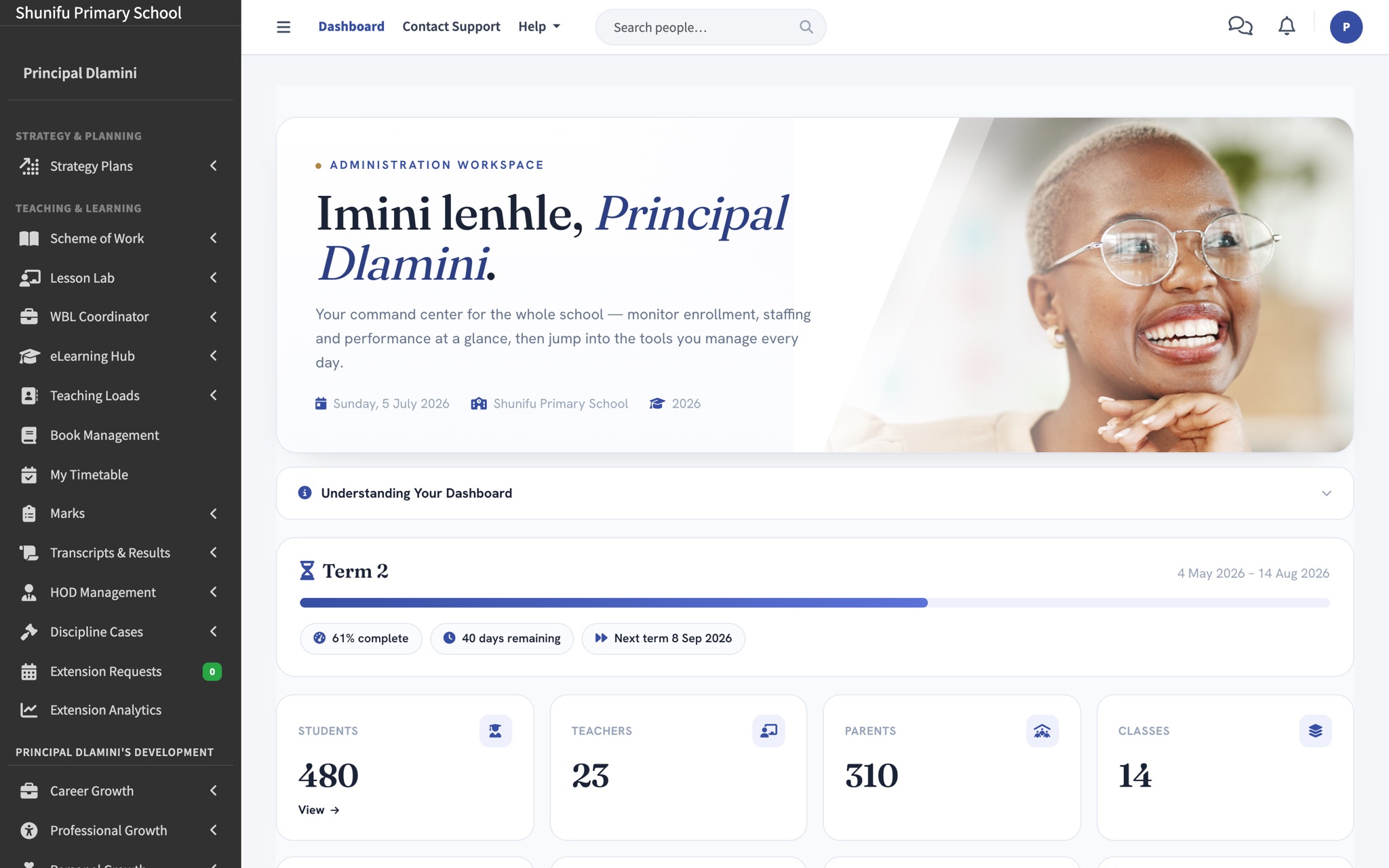
ShunifuAdministration workspace
Shunifu administration preview showing its navigation, academic term and school overview.
Administration workspace preview. School identity and figures shown are demonstration examples. View full-size preview.

Students & parents

Student records and admissions

One profile per student covering enrolment, class, attendance and documents. Parents log in with a phone OTP to check grades, attendance and fees. Applications are taken online through a published prospectus, and existing students can be imported from a spreadsheet.


Teaching & academics

Marks, report cards and timetables

Teachers enter marks, and Shunifu calculates averages and rankings and produces report cards. Timetables are generated without clashes. Dashboards show pass rates, subject performance and students who are falling behind.

Operations & finance

Fees, payments and staff

Set fee structures and record payments by MTN MoMo, card or bank transfer, with automatic SMS reminders. Staff records, leave and payroll preparation are handled in the same system.

Schools, colleges, and government institutions

  • William Pitcher College
  • Ngwane Teachers College
  • Salesian High School
  • St. Francis High School
  • Evelyn Baring High School
  • Manzini Nazarene High School
  • St. Michael's High School
  • Kaboyce High School
  • St. Theresa's High School
  • Mhlatane High School
  • Swazi National High School
  • Siteki Nazarene High School
  • Somnjalose High School
  • Ngomane High School
  • Charles Wesley High School
  • Lusoti High School
  • Woodlands High School
  • Bahai Primary School
  • Mbabane Central High School
  • Masundvwini National High School
  • Vuvulane High School
  • Mavula Community High School
  • Makhonza High School
  • Ebenezer FEA High School
  • St. Mark's Primary School
  • Mhlume High School

Accomplishments

The system Eswatini trusted with its first national CBE results.

When ECESWA processed the country’s first Competency-Based Education results for Grade 7, covering every primary school in the nation, it ran on Shunifu.

Mentioned in Government Ministerial Report

The Government of Eswatini’s 2025 Commerce annual report records the successful implementation of Shunifu for data management at the National Handcraft Training Centre.

The government’s 2024 performance report describes the implementation in collaboration with the Royal Science & Technology Park.

National Asisungule Awards 1st Prize ICT

Explore Shunifu’s impact

In their own words

St Michael's High School

Secondary School

“We cannot overstate the positive impact Shunifu has had at St Michael's High. It has simplified our assessment and reporting procedures, saving us time, minimizing errors, and improving efficiency and we are grateful for its invaluable contribution to our school's success.”

Mrs N.F Simelane, Principal, St Michael's High School

View school testimonials

See Shunifu in action.

Watch the platform demonstration and Shunifu’s television feature. For a walkthrough focused on your school, tell the team which workflows you would like to explore.

Visit our YouTube channel

Eleven modules for a more productive school day.

Bring student information, teaching, fees and staff administration together. These eleven modules help teachers prepare reports, keep parents informed and give administrators a clearer view of the work running through their school. Explore the tools that support each part of the school day.

Students & parents

  • Student records & enrolment

    Keep each learner's school history organised from enrolment onwards. Bring profiles, class placements, enrolment history, parent links and documents together, with individual registration or bulk spreadsheet imports.

  • Attendance tracking

    Build a clear picture of participation so staff can follow up on absence. Record daily and lesson attendance by class, and review cumulative attendance reports and patterns.

  • Online admissions

    Make it easier for families to apply and for staff to manage each application. Publish a prospectus, build application forms without coding, collect submissions and documents, arrange interviews by SMS and follow accepted learners into enrolment.

  • Parent portal & SMS

    Give parents a direct connection to their child's school information. Parents use a one-time phone code to access grades, attendance and fee information, while individual and class text messages use the Africa's Talking SMS integration.

  • Student progression

    Make end-of-year decisions with the learner's academic history in view. Review results and promotion criteria, record advancement, repeat and transfer decisions, and follow progression through to graduation.

Teaching & academics

  • Marks & report cards

    Produce complete reports from the marks teachers have already entered. Calculate term averages and rankings, support configured grade point average (GPA) reporting, add individual learner comments and generate print-ready report cards without retyping results.

  • Timetable generation

    Build a teaching schedule around the way your school operates. Use teacher availability, room constraints and double-period rules to generate timetables automatically, review unplaced lessons and export schedules to PDF for staff and learners.

  • Analytics & dashboards

    See where your school is progressing and where learners need support. Review class, subject and term performance, pass rates, attendance patterns, fee collection and at-risk student indicators.

  • Curriculum management

    Keep teaching and assessment connected to the curriculum. Organise syllabi, subjects and competencies, map learning outcomes to assessments, and review assessment coverage against curriculum requirements.

Operations & finance

  • Fees & payments

    Give staff and families a clear view of school fees and payments. Set fees by class or programme, record MTN MoMo, card and bank-transfer payments, and prepare student statements from the same financial records.

  • HR & staff management

    Keep the people who run your school organised. Bring staff profiles, qualifications, teaching responsibilities, contracts, leave requests, employment history and payroll information together.

Explore all eleven modules

One record.
Every role.

A school record matters when the right person can use it. Teachers prepare reports, parents find routine information, and leadership sees the wider academic picture through the same platform.

For teachers

Prepare lesson plans, enter assessment marks and produce report cards from the same platform. Use class records and reports to plan the next teaching steps.

For students

Attendance, assessment and progression history stay together through the school year, helping teachers decide where each learner needs closer attention.

For parents

Check your child’s marks and available fee statements through your school account. Find routine information between school reports and stay informed through school messages.

For school leadership

See enrolment, academic performance and fee information together. Review class and subject trends when planning academic support.

For administrators & registrars

Build class lists from existing student information. Review applications, maintain enrolment records and keep daily administration connected.

For finance teams

Answer fee queries from student statements backed by recorded payments. Keep fee structures and payment records linked to the student account.

The manual work every school knows, and what replaces it.

Report cards from the marks you enter

Shunifu turns entered marks into calculated, printable report cards, instead of typing them into Word documents one by one, every term.

Applications tracked online

Publish application forms, review submissions and track their status through the admissions process.

A self-service parent portal

Parents can check their child’s marks and available fee statements through their school account.

Timetables built around your school’s rules

Generate teaching schedules from teachers, classes and timetable constraints, then review lessons that could not be placed.

Academic performance in view

Compare class and subject results, pass rates and term trends to decide where closer attention is needed.

From classroom management
to national exam processing.

Connect classroom teaching with the wider work of education. Plan lessons, deliver online learning and support teacher development, while managing workplace learning, scholarships, exam-board processes and campus records.

AI lesson planning

Turn lesson preparation into a structured planning process. Draft and refine lesson plans with AI assistance, edit the content and submit plans for school review and approval.

Online learning

Extend learning beyond the classroom while keeping learner progress in view. Build courses with modules, lessons and quizzes, include standard e-learning packages (SCORM), and record completion.

Teacher professional development

Make professional development part of each teacher's ongoing record. Bring courses, certificates, development events and individual plans together so professional growth is easier to follow.

Work-based learning

Connect learning with workplace experience. Publish internship opportunities, manage placements, review work logs and track competency progress throughout the placement.

Exam board workflows

Keep exam administration organised from candidate registration through to results. Register candidates, capture assessment marks, process results and prepare statements of achievement.

Scholarship management

Keep the scholarship process organised from application to award and disbursement. Collect applications and supporting documents, score submissions, record awards and track scheduled payments.

Campus management

Organise academic administration across your institution's campuses. Maintain campus records and faculty assignments within the same institutional structure.

Modules and setup are selected around your institution’s requirements.

Getting your school started.

Start with the work your school needs to bring together. Setup covers your school structure, existing records and the people who will use Shunifu.

  1. We talk

    Tell us about your school’s size, structure and priorities. Explore the workflows your teachers, administrators and finance team need.

  2. We set you up

    Set out classes, subjects, fee structures and timetable rules. Plan student spreadsheet imports, configuration and staff training around the agreed setup.

  3. You go live

    Introduce the agreed workflows into daily school work, with the rollout and support arrangements in place.

Get Shunifu for your school
A short, silent Shunifu film about helping teachers work more efficiently. Use the player controls to play or pause.

Your school’s records.
Access by responsibility.

Student and financial records serve different people across a school. Shunifu organises school data and permissions around those responsibilities.

School-specific data

Shunifu uses school-specific databases in its school platform. Your institution’s data setup is part of onboarding.

Access follows responsibilities

Roles and permissions control access to school workflows. Parent access is linked to the child’s record.

Reports and exports

Generate reports and student statements from recorded information. Plan the formats, exports and data-handling arrangements your school needs.

Read about data and access

Before you get started.

A few practical questions before your school takes the next step.

+268 7689 0726
Can we see how Shunifu works?

Watch the platform demonstration, or contact the team with the workflows you would like to explore for your school.

Can we bring in our existing records?

Student spreadsheet import is part of the platform. Review the fields, file format and records your school wants to bring across during setup.

What does it cost?

The team can confirm current pricing and the scope of your school’s setup, training and support.

How do existing users sign in?

Find your school in the directory, then follow its sign-in link. Your school administrator can help with your account.

Let’s talk about your school.

Bring your school’s priorities, the records you already hold and the workflows you want to improve. We’ll explore how Shunifu fits your institution and what setup involves.